


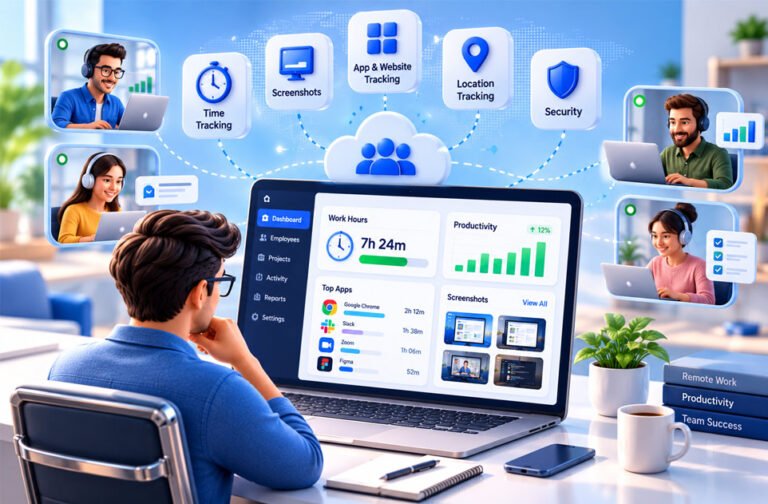
Remote employee monitoring software helps companies check the work of employees who work from home or other places. It can track work hours, attendance, apps, websites, projects, and other work activities.
Some tools only track working time. Others can take screenshots, record screens, track locations, and create work reports.
Companies use this software to manage remote workers, track projects, record billable hours, and protect company data. However, monitoring employees can also create privacy, trust, and legal concerns.
This guide explains how remote employee monitoring software works, its features, popular tools, prices, benefits, risks, privacy, and legal issues.
What Is Remote Employee Monitoring Software?
Remote employee monitoring software is a tool that helps companies track the work of employees outside the office.
It can show when an employee starts work, how long they work, and which projects they work on. Some tools can also track apps, websites, idle time, screenshots, computer activity, and location.
Managers can normally see this information on a dashboard. They may use it to check attendance, timesheets, projects, client billing, and work activity.
The software is mainly used for remote workers. It can also be useful for hybrid employees, freelancers, outsourced workers, and field teams.
Time tracking and employee monitoring are not exactly the same.
A time tracking tool mainly records working hours. A productivity monitoring tool can also track apps, websites, active time, and work patterns.
More advanced monitoring software may take screenshots or record screens. Security tools may also look for risky activity or possible data leaks.
A business should choose only the features it really needs. If a company only needs timesheets, for example, it may not need screen recording or keystroke logging.
How Does Remote Employee Monitoring Software Work?
Most monitoring software uses an app installed on an employee’s computer or mobile device. Some tools may also work through a browser extension.
First, the company creates an account and adds its employees. It then chooses what information it wants to track.
For example, a company may use time tracking and app tracking but keep screenshots turned off.
While the employee works, the software collects the allowed information. Managers can then see this information on a dashboard.
There are different ways to track work.
With manual tracking, employees start and stop a timer themselves. This can be useful when they work on different projects during the day.
With automatic tracking, the software tracks work without asking the employee to start the timer each time.
Some tools can also work in the background. Hidden monitoring, however, can create privacy and legal problems.
Many tools also track active and idle time.
Active time usually means the employee is using the keyboard or mouse. Idle time means there has been no keyboard or mouse activity for a certain time.
But idle time does not always mean an employee is not working. They may be reading, thinking, attending a meeting, or talking to a client.
Some tools can also work without an internet connection. They save the information and upload it when the internet is available again.
Main Features of Remote Employee Monitoring Software
Features are different from one tool to another. Some tools provide simple time tracking, while others offer detailed monitoring and security features.
Time and Attendance Tracking
Time tracking records how long employees work.
Employees may start and stop a timer themselves. Some software can also track work time automatically.
The software can create daily or weekly timesheets. Companies may use these for attendance, payroll, client billing, and project costs.
Some tools can also track breaks and idle time.
They may also separate billable and non-billable hours. This can be useful for agencies, consultants, developers, and other businesses that charge clients based on time.
Screenshots and Screen Monitoring
Some tools can take screenshots of an employee’s screen during working hours.
Screenshots may be taken at set times or randomly.
More advanced tools may also offer live screen viewing or screen recording.
These features can help managers understand work activity. However, they can also create privacy problems.
A screenshot may accidentally show private messages, customer details, financial information, or other sensitive data.
Companies should use screen monitoring only when they really need it.
App and Website Tracking
App tracking shows which programs employees use while working.
For example, it may show time spent on a browser, design software, communication app, or project management tool.
Website tracking shows which websites employees visit during work.
Some software marks apps and websites as productive, neutral, or unproductive.
These labels are not always correct.
For example, an employee may use YouTube for training or research. A tool may still mark it as unproductive.
Managers should understand the reason an app or website was used before judging an employee’s work.
Activity and Productivity Tracking
Activity tracking usually measures keyboard and mouse use.
The software may show this activity as a percentage or score.
However, this score does not always show how productive someone really is.
High activity does not always mean good work. Low activity does not always mean poor work.
An employee may be reading, researching, planning, or attending a meeting without using the keyboard much.
Keyboard activity tracking is also different from keystroke logging.
Some tools only count keyboard activity. They do not record what the employee types.
Keystroke logging can record the actual keys being typed. This creates more serious privacy and security concerns.
Projects, Tasks, and Reports
Many tools allow employees to connect their work time with projects and tasks.
For example, an employee may select a client or project before starting a timer.
Managers can then see how much time was spent on that project.
This can help companies understand project costs, plan future work, and create client bills.
Reports may show work hours, attendance, app usage, activity, project time, and work trends.
Some tools also have live dashboards. These can show which employees are working, idle, or offline.
GPS and Location Tracking
Some employee monitoring tools include GPS tracking.
This feature is mainly useful for workers who travel for their jobs.
For example, it may be useful for delivery workers, sales teams, technicians, and construction workers.
Some tools also provide geofencing. This connects time tracking with a certain work location.
GPS tracking may not be very useful for employees who work from home on a computer.
Companies should also avoid tracking an employee’s location outside working hours unless there is a clear and lawful reason.
Alerts and Security Features
Advanced tools can send alerts when certain activities happen.
For example, a manager may receive an alert if unusual activity happens or a restricted app is used.
Security-focused tools may also offer screen recording, data loss protection, and tools for finding risky employee activity.
Some software can also record keystrokes.
These features may be useful for businesses that handle sensitive information. However, companies need to use them carefully because they can create privacy and security risks.
Popular Remote Employee Monitoring Software
There is no single monitoring tool that is best for every company.
Some are better for time tracking. Others focus on productivity, field workers, billing, or security.
Hubstaff
Hubstaff combines time tracking with workforce management tools.
It can track work hours, screenshots, apps, websites, and keyboard and mouse activity.
It also provides project, payroll, invoicing, reporting, GPS, and geofencing features.
GPS and geofencing can be useful for companies with field workers.
Hubstaff says it measures keyboard and mouse activity but does not record the actual keys employees type.
Time Doctor
Time Doctor is made for remote and distributed teams. It is also used by outsourcing companies and BPOs.
It provides time tracking, attendance, screenshots, app and website reports, projects, breaks, and payroll-related features.
Some higher plans also provide screen recording and unusual activity reports.
Time Doctor can also provide productivity alerts.
Managers should still check the full situation before deciding that an employee is wasting time.
ActivTrak
ActivTrak mainly focuses on workforce and productivity information.
It helps managers understand work patterns, app usage, workloads, and productivity trends.
ActivTrak says it does not provide traditional keystroke logging, email monitoring, camera access, or video recording.
It may be useful for businesses that want work information without using some of the more detailed monitoring methods.
Insightful
Insightful was previously called Workpuls.
It focuses on workforce activity and work patterns.
It can track apps and websites, take screenshots, track work time, and show how employees spend their working day.
It can also mark websites and apps as productive, neutral, or unproductive.
Other tools can help businesses understand employee workloads, schedules, and slow work processes.
Teramind
Teramind focuses more on security than simple time tracking.
It combines employee monitoring with tools that can help companies find security risks and possible data leaks.
Depending on the setup, it may provide live screen viewing, screen history, app and website monitoring, alerts, rules, and keystroke monitoring.
These tools may be useful for companies that handle sensitive data.
However, a small business that only needs time tracking may not need these advanced features.
TimeCamp
TimeCamp mainly focuses on time tracking, projects, timesheets, and billing.
Businesses can use it to see how much time employees spend on different projects and tasks.
It can be useful for agencies, freelancers, consultants, and businesses that need accurate work records.
TimeCamp has both free and paid options.
Apploye
Apploye combines time tracking with employee monitoring.
Its reported features include screenshots, live activity, app and website tracking, activity percentages, idle time, project tracking, payroll, invoicing, and reports.
The information collected for this article also mentions a stealth monitoring option.
Businesses should be careful with hidden monitoring because privacy and legal rules can be different in each location.
Apploye is mainly aimed at BPOs, agencies, call centers, IT companies, and software teams.
Clockify
Clockify mainly focuses on time tracking and project management.
Its free option can be useful for freelancers, startups, and small teams that mainly need work-hour records.
Paid plans can offer more features.
Clockify may be a better choice for companies that want simple time tracking instead of detailed employee monitoring.
Time Champ
Time Champ combines time tracking with employee monitoring.
Its reported features include app and website tracking, attendance, break tracking, screen monitoring, productivity reports, alerts, location tracking, and integrations.
Its information also mentions keystroke logging.
Companies should check whether they really need this feature and whether it is allowed under the laws that apply to them.
Remote Employee Monitoring Software Pricing
Most remote employee monitoring software charges per user per month.
The total price depends on the number of employees, features, plan, and billing period.
Some companies give a lower monthly price when customers pay for a full year.
There are also free plans and free trials.
A free plan can normally be used for a long time, but it may have limits.
A free trial gives users paid features for a short time before they need to pay.
Based on the pricing information collected for this article, Hubstaff starts at around $4.99 per user per month with annual billing. Time Doctor starts at around $6.67 per user per month. ActivTrak has a limited free option and paid plans.
TimeCamp also offers a free option.
Prices can change. Businesses should always check the latest prices before buying.
Some advanced features may cost more. These can include extra screenshots, longer data storage, detailed reports, and security tools.
Some providers may also require businesses to pay for a minimum number of users.
Companies should therefore compare the full cost, not only the starting price.
Free vs Paid Remote Employee Monitoring Software
Free monitoring software may be enough for small businesses with simple needs.
A free plan may provide time tracking, timesheets, projects, and basic reports.
However, free plans usually have limits.
Paid plans may offer screenshots, detailed activity reports, app and website tracking, payroll tools, integrations, scheduling, and longer data history.
Advanced security tools are also more likely to be part of paid plans.
Free tools can be useful for freelancers, startups, and small teams that mainly need time tracking.
Paid software may be better for larger companies that need detailed reports, billing tools, security features, or more integrations.
Businesses should choose the plan that gives them the features they need without collecting unnecessary employee information.
Benefits of Remote Employee Monitoring Software
Remote employee monitoring software can make remote teams easier to manage.
It can provide better work-hour records. Managers can check attendance, breaks, project time, and total working hours.
It can also help companies understand how much time different tasks take.
This information can help with project planning and future estimates.
Agencies, consultants, and other businesses can use tracked time for client billing. Some tools can also connect with payroll systems.
Reports may help companies find work processes that take too much time.
Security-focused tools can also help find unusual activity that may put company data at risk.
Monitoring software can be useful for companies with employees in different locations and time zones.
However, the software does not automatically improve productivity.
Managers should also look at completed work, quality, deadlines, and communication.
Drawbacks and Risks
Employee monitoring also has some disadvantages.
Privacy is one of the biggest concerns.
Monitoring software may collect information about apps, websites, computer activity, screens, and locations.
Some tools can also record screens or keystrokes.
There can be more privacy problems when employees use their personal computers or phones for work.
Private messages, files, accounts, or other personal information may be collected by mistake.
Monitoring can also reduce trust between workers and managers. Employees may feel uncomfortable if they think they are always being watched.
Productivity scores can also be misleading.
An employee may have low keyboard activity while reading, planning, attending a meeting, or talking to a customer.
Apps and websites can also be marked incorrectly as unproductive.
Monitoring software also costs money and needs proper setup.
The collected information itself can become a security risk if the company does not protect it correctly.
Privacy and Data Security
Companies should think about privacy before they start monitoring employees.
Employees should know what is being tracked and why.
A clear company policy should explain what information is collected, when monitoring happens, which devices are monitored, and how the information will be used.
Companies should also control who can access the data.
For example, a manager who only needs timesheets may not need to see screenshots.
Businesses can use security methods such as encryption, strong passwords, multifactor authentication, and access controls.
They should also decide how long they will keep monitoring data.
Personal devices need extra care because employees may use the same device for both work and private activities.
Businesses can use work schedules, privacy controls, or separate work profiles where possible.
Keystroke logging needs special care because it may collect passwords, private messages, financial details, and other sensitive information.
Businesses should collect only the information they really need.
Is Remote Employee Monitoring Software Legal?
Remote employee monitoring software can be legal, but laws are different around the world.
The rules may depend on where the company is located, where the employee works, what is being monitored, and how the information is used.
Owning an employee’s work computer does not always mean the company can monitor everything on it.
United States
Employee monitoring in the United States can be covered by federal and state laws.
Rules may be different for computer activity, messages, audio, location tracking, and other types of monitoring.
Some states may require companies to give employees notice or get consent in certain situations.
Businesses should check the laws where their employees work.
Companies should also be careful when AI or automated systems are used to judge employees or make employment decisions.
United Kingdom
UK businesses need to consider data protection rules when monitoring employees.
A company should have a proper reason and lawful basis for collecting employee information.
The level of monitoring should also be reasonable for its purpose.
Employees should normally understand what is being monitored and why.
Businesses should also think about privacy, data security, how much information they collect, and how long they keep it.
European Union
Employee monitoring in the European Union may come under the General Data Protection Regulation, or GDPR.
Businesses need a proper reason and lawful basis for collecting personal information.
They also need to think about privacy, transparency, security, data storage, and employee rights.
Some types of monitoring may require a Data Protection Impact Assessment.
Individual EU countries may also have their own employment and privacy rules.
International Remote Teams
A company may have remote employees in several countries.
This can make monitoring more complicated.
The law in the company’s country may not be the only law that matters. Rules in the employee’s country can also apply.
Moving monitoring information between countries may also create extra legal requirements.
Companies should carefully check local laws before using features such as hidden monitoring, keystroke logging, screen recording, audio recording, or GPS tracking.
How to Monitor Remote Employees Without Hurting Trust
Companies should be clear with employees about monitoring.
Employees should know what is being tracked, when it happens, why it is needed, and who can see the information.
Companies should also explain why they are using the software.
For example, a business may use it to track project time or create accurate client bills.
A company should not collect information simply because the software can collect it.
If basic time tracking is enough, there may be no reason to record screens or track every website.
Employees should also understand how the software works.
They should know how to report wrong records, technical problems, or privacy concerns.
Companies can also ask employees for feedback.
Monitoring information should not be the only way to judge employee performance.
Managers should also consider completed work, work quality, deadlines, and communication.
How to Choose Remote Employee Monitoring Software
First, decide why your company needs monitoring software.
If you only need timesheets, a simple time tracking tool may be enough.
If your business handles sensitive information, you may need stronger security features.
Think about the size of your team as well.
A small company may only need simple tools. A large business may need advanced reports, user permissions, integrations, and security features.
Also think about how your employees work.
Field workers may need GPS and geofencing. Home-based workers may need time and project tracking.
Check which devices the software supports. Features can be different on Windows, macOS, Linux, Android, and iOS.
If employees sometimes work without internet access, check whether offline tracking is available.
Privacy controls are also important. Companies should be able to control what information is collected and who can see it.
Check integrations as well. The software may connect with project management, payroll, accounting, communication, or customer management tools.
Finally, compare the full cost.
Check user limits, contracts, paid extras, storage limits, and advanced features.
A free trial can help a business test the software before using it across the whole company.
Who Should Use Remote Employee Monitoring Software?
Remote employee monitoring software can be useful for many businesses.
BPOs and outsourcing companies can use it to manage remote teams.
Customer support companies can use attendance and schedule information to manage work shifts.
Software and IT companies can track project time and workloads.
Marketing agencies can connect work hours with clients, campaigns, and projects.
Consultants and accounting companies can use time records for billing.
Companies with field workers may use GPS and location tracking.
Businesses that handle sensitive information may use security-focused monitoring tools.
However, detailed monitoring is not right for every job.
Writers, designers, developers, researchers, and managers may spend a lot of useful time reading, thinking, planning, or communicating.
For these jobs, completed work and work quality may be more useful than constant computer activity.
Alternatives to Employee Monitoring Software
Detailed monitoring is not always needed.
Businesses can also manage remote workers using simpler methods.
Standard Time Tracking
Basic time tracking records working hours without collecting detailed computer activity.
It can be enough for businesses that only need timesheets, payroll records, or billable hours.
Project Management Software
Project management tools help companies manage tasks, deadlines, and projects.
Managers can see whether work is being completed without constantly monitoring employees’ computers.
Task Boards and Milestone Tracking
Task boards show which work is planned, in progress, or completed.
Milestones help teams follow the progress of larger projects.
These methods focus on results instead of computer activity.
Weekly Progress Reports and Team Meetings
Employees can give regular updates about completed work, current tasks, and problems.
Short team meetings can also help managers understand what is happening without constant monitoring.
Goal and Performance Management Systems
Performance management tools focus on goals, reviews, feedback, and employee development.
PeopleGoal, for example, focuses on goals, OKRs, reviews, feedback, and employee development instead of detailed computer monitoring.
Deliverable-Based Performance Measurement
Some businesses can judge employees by the work they complete.
For example, writers can be judged by article quality and deadlines. Developers can be judged by completed work and code quality.
This can be useful when computer activity does not show the real value of an employee’s work.
Common Problems and Troubleshooting
Employee monitoring software can sometimes show wrong or missing information.
Missing Tracked Hours
Work hours may be missing if the timer was stopped or the app was closed.
Check the timer, settings, and timesheet. Correct the time manually if the software allows it.
Offline Activity Is Not Syncing
Some tools save work data when there is no internet connection.
Reconnect the device and wait for the software to sync.
Also check whether the tool supports offline tracking.
Screenshots Are Not Appearing
Screenshots may be turned off or may not be included in the current plan.
Check the screenshot settings, device permissions, and plan features.
Idle Time Looks Incorrect
Idle time is usually based on keyboard and mouse activity.
An employee may look idle while reading, thinking, talking to a client, or attending a meeting.
Managers should check the situation before deciding the employee was not working.
Apps or Websites Have the Wrong Productivity Rating
Automatic productivity ratings can be wrong.
Change the rating if the software allows it.
Different job roles may also need different ratings.
Timesheets Are Incorrect
Timesheet errors can happen because of forgotten timers, wrong project settings, sync problems, or incorrect time zones.
Check the original records and allow employees to report mistakes.
Payroll Does Not Match Recorded Time
Check timesheets, pay rates, time zones, rounding settings, and payroll settings.
Do not assume the monitoring software is always correct.
The Monitoring App Slows the Device
Some monitoring features use more computer resources than others.
Screen recording and frequent screenshots may use more resources than simple time tracking.
Check the system requirements and turn off features that are not needed.
Employees Raise Privacy Concerns
Companies should take employee privacy concerns seriously.
Review what information is being collected and why.
Employees should also have a simple way to ask questions or report problems.
The company should check its monitoring policy and local legal requirements.
Best Practices for Remote Employee Monitoring
Only collect information that your business really needs.
Create a clear monitoring policy before using the software.
Tell employees what is tracked, why it is tracked, who can see the data, and how long the information will be stored.
Use the least detailed monitoring that can meet your needs.
If time tracking is enough, you may not need screenshots, screen recording, or keystroke logging.
Protect monitoring data and only allow the right people to access it.
Check productivity ratings regularly because apps, websites, and work needs can change.
Do not use activity scores as the only way to judge an employee.
Also consider completed work, quality, deadlines, and communication.
Review your monitoring system from time to time. Turn off features that are no longer needed.
Bottom Line
Remote employee monitoring software helps companies track remote work.
It can track work hours, attendance, projects, apps, websites, and computer activity. More advanced tools may also provide screenshots, GPS tracking, screen recording, and security features.
These tools can help businesses manage remote teams, but more monitoring is not always better.
Too much monitoring can create privacy, trust, security, and legal problems.
Businesses should use only the features they need. They should also protect employee data and clearly explain how monitoring works.
Frequently Asked Questions
What is remote employee monitoring software?
It is software that helps companies track remote workers. It can track work hours, apps, websites, projects, and other work activity.
How does remote employee monitoring software work?
It runs on an employee’s computer or phone and tracks work activity. Managers can see this information on a dashboard.
Can remote monitoring software see everything on an employee’s computer?
Not always. It depends on the software and which tracking features the company turns on.
Is remote employee monitoring software legal?
It can be legal, but laws are different in each country or region. Companies should check local privacy and employment laws.
Can employers monitor employees without telling them?
It depends on local laws and the type of monitoring. Some places require employers to tell workers or get their consent.
Does employee monitoring software record keystrokes?
Some tools can record keystrokes, while others only measure keyboard activity without recording what is typed.
Does employee monitoring software improve productivity?
It can help managers understand how work time is used. However, monitoring alone does not always improve productivity.
What is the best remote employee monitoring software?
There is no single best option. Popular choices include Hubstaff, Time Doctor, ActivTrak, and Teramind, depending on business needs.
