


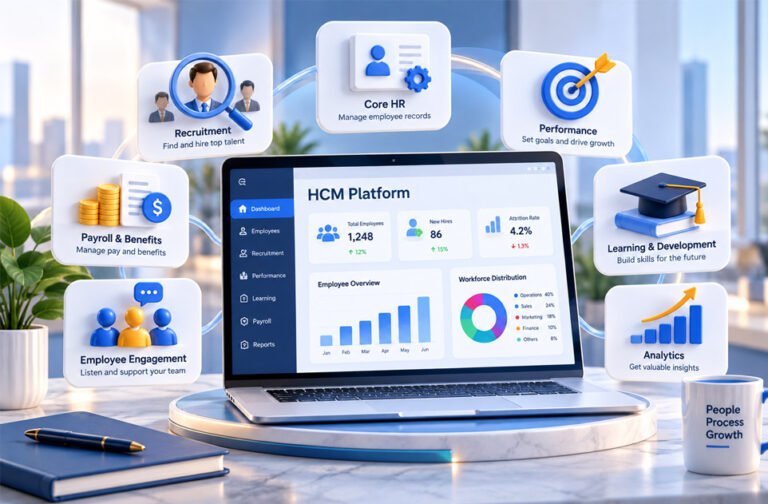
An HCM platform is software that helps a business manage its employees and HR work. HCM stands for Human Capital Management.
An HCM system can keep employee records, manage hiring, onboarding, payroll, benefits, attendance, performance, training, and other HR tasks.
It can also help businesses understand their workforce better. This guide explains what an HCM platform is, how it works, its main features, benefits, limitations, pricing, security, and how to choose the right one.
What Is an HCM Platform?
An HCM platform is an HR software system that helps a company manage employees throughout their time with the business.
It can cover many stages of employment. These include hiring, onboarding, payroll, training, performance reviews, career development, and leaving the company.
The main purpose is to keep important employee information in one connected system. This can reduce the need for separate spreadsheets and HR tools.
HCM software does more than store names, job titles, salaries, and other records. It can also help a business understand its workforce.
For example, an HCM system may show employee turnover, hiring needs, skills gaps, labor costs, and performance trends. Some platforms can also help companies plan their future workforce.
Not every HCM platform offers the same tools. Some provide a large set of HR features. Others focus on certain areas and connect with separate payroll, hiring, learning, or workforce management software.
How Does an HCM Platform Work?
An HCM platform usually starts with a central employee database.
This database can store an employee’s job, department, manager, work location, salary, employment status, and other HR information.
Different parts of the platform can use the same information. For example, payroll can use salary and working-hour data. Performance tools can use job and goal information. Training tools can use an employee’s role and skills.
This means HR teams do not always need to enter the same information into several different systems.
HCM platforms can also automate common tasks.
For example, when an employee requests leave, the request can automatically go to the correct manager. When someone joins the company, the system may start onboarding tasks, collect documents, assign training, and request approvals.
Many platforms also offer employee self-service. Employees may be able to update their details, request leave, check benefits, view payslips, complete training, or review their goals.
Managers may use the system to approve requests, check team information, and complete performance reviews.
HCM software can also create reports and dashboards. These can show headcount, turnover, attendance, hiring activity, workforce costs, and other useful information.
Some advanced platforms also offer forecasting and predictive analytics.
HCM systems can connect with other business software through APIs, prebuilt integrations, and single sign-on (SSO).
The exact features depend on the HCM provider and plan.
Core Features of an HCM Platform
HCM platforms can include many different HR tools. A business may use the complete system or only the parts it needs.
Core HR and Employee Records
Core HR keeps important employee information in one place.
This can include names, contact details, job titles, departments, managers, work locations, salaries, employment status, and HR documents.
The system can also show how teams, managers, and employees are connected inside the company.
Digital employee records can reduce the need for paper documents and spreadsheets.
Many systems also offer self-service tools. Employees may be able to update some of their own information. Managers may be able to view team information and approve requests.
Access should be controlled so people only see information they are allowed to see.
Recruitment and Onboarding
Many HCM platforms include hiring tools or connect with an applicant tracking system.
These tools can help businesses create job openings, receive applications, track candidates, manage interviews, and record hiring decisions.
Some HCM platforms also use automation or AI to help with certain hiring tasks.
After a person is hired, onboarding tools help them become an employee.
The system may collect documents, create onboarding tasks, provide company information, assign training, and send approval requests.
Information collected during recruitment may also move directly into the employee’s HR record.
Payroll, Time, and Attendance
Many HCM platforms offer payroll tools, but payroll support can differ by country.
Payroll features may calculate employee pay, manage deductions, keep payroll records, and support tax-related work.
Some HCM platforms have their own payroll system. Others connect with outside payroll providers.
Time and attendance tools can track working hours, shifts, overtime, absences, and attendance.
Employees may also use the platform to request leave. The request can go to a manager for approval, and the system can update the employee’s remaining leave.
Some HCM platforms also include shift scheduling. This can be useful for businesses with hourly or frontline workers.
Companies should always check whether a platform supports the payroll, tax, labor, and time rules of the countries where they operate.
Benefits and Compensation
HCM software can also help companies manage employee benefits and pay.
Benefits may include health plans, insurance, retirement programs, and different types of leave.
Employees may be able to view available benefits and make choices through a self-service portal.
Compensation tools can help HR teams manage salaries, bonuses, pay changes, and compensation budgets.
Some platforms also offer employee rewards and recognition tools.
More advanced systems may help businesses plan future compensation costs.
Performance and Talent Management
Performance tools help businesses track how employees are doing at work.
They can include performance reviews, goals, feedback, development plans, and progress tracking.
Some platforms support regular check-ins instead of only using yearly performance reviews.
Certain systems also provide 360-degree feedback. This can collect feedback from managers, coworkers, team members, and other people.
Talent management can also help companies prepare employees for future roles.
Succession planning tools can identify employees who may be able to take important positions in the future.
Skills data can also help businesses find current employees who may be suitable for other roles inside the company.
Learning and Development
Learning tools help businesses train employees.
Some HCM platforms include their own learning management system. Others connect with a separate LMS.
Employees may receive training based on their job, department, skills, or company requirements.
The system can record completed courses and show training progress.
Learning tools can also connect with performance management. For example, if an employee needs to improve a skill, the company may assign suitable training.
Workforce Management and Planning
Workforce management focuses on daily staffing needs.
It may include shift scheduling, attendance, labor planning, and managing where employees are needed.
Workforce planning looks further into the future.
It helps a business understand how many employees it may need and which skills could be important later.
HCM data can also help companies understand employee numbers and workforce costs.
Some advanced platforms allow businesses to test different workforce plans before making major decisions.
Employee Engagement
Some HCM platforms provide employee engagement tools.
These may include surveys, short pulse surveys, feedback tools, recognition programs, and employee sentiment features.
HR teams can use this information to better understand how employees feel about their work experience.
However, HCM platforms do not always provide advanced communication and engagement tools.
Some companies therefore connect their HCM system with a separate employee experience platform.
Reporting, Analytics, and AI
HCM platforms can turn employee data into reports and useful insights.
Dashboards may show employee numbers, turnover, attendance, hiring activity, workforce costs, performance, and training information.
Analytics can help HR teams find patterns in this data.
For example, a company may find that one department has higher employee turnover than others. It may also see which jobs take longer to fill or where important skills are missing.
Modern HCM platforms are also adding AI and machine learning.
AI may help with candidate matching, skills analysis, workforce planning, recommendations, and finding possible employee turnover risks.
However, AI features are different on every platform. Their results also depend on the quality of the available data.
Important decisions about employees should still involve human review.
HCM vs HRMS vs HRIS
HCM, HRMS, and HRIS are similar terms, but they traditionally have slightly different meanings.
HRIS stands for Human Resources Information System. It mainly focuses on employee records and basic HR work.
HRMS stands for Human Resources Management System. It often adds more HR functions such as payroll, attendance, benefits, and hiring.
HCM stands for Human Capital Management. It usually covers a wider range of areas, including talent management, learning, workforce planning, analytics, and long-term employee development.
Here is a simple comparison:
| System | Main Focus |
|---|---|
| HRIS | Employee records and basic HR |
| HRMS | HR administration, payroll, attendance, and other HR processes |
| HCM | Full employee lifecycle, talent, analytics, and workforce planning |
These definitions are not strict.
Many modern software companies use the terms HRIS, HRMS, and HCM for products that have similar features.
Businesses should therefore compare the actual features instead of choosing software only because it is called HCM, HRMS, or HRIS.
HCM Platform vs Employee Experience Platform
An HCM platform and an employee experience platform have different main purposes.
An HCM platform mainly manages HR information and processes. It can be the main system for official employee records, payroll information, job details, and other HR data.
An employee experience platform focuses more on employee communication and engagement.
It may offer company news, messaging, surveys, recognition tools, knowledge resources, and other communication features.
For example, the HCM platform may process an employee’s payroll. An employee experience platform may be where that employee reads company updates and communicates with coworkers.
Some features can overlap between the two types of software.
Because of this, some companies use both systems and connect them together.
They may be connected through APIs, SSO, SAML, OAuth, or other supported methods.
This allows the HCM platform to remain the main source of HR information while the employee experience platform handles more communication and engagement work.
Benefits of Using an HCM Platform
One of the main benefits of an HCM platform is having HR information in one connected system.
This can reduce duplicate work and make employee information easier to manage.
Automation can also save time. Tasks such as leave approvals, onboarding, attendance tracking, and some payroll work can be automated.
Centralized data can make reporting easier. HR teams can check information about hiring, turnover, performance, employee numbers, and workforce costs without collecting data from many separate systems.
Employee self-service can also reduce simple HR requests. Employees may be able to check benefits, request leave, update details, or view payroll information themselves.
HCM software can also help with future planning. Businesses can use workforce information to understand where they may need new employees, training, or new skills.
Limitations and Challenges
Setting up an HCM platform can take time.
Moving old employee information into the new system can be difficult, especially if the data is stored in several spreadsheets and older systems.
Companies may need to clean incorrect, old, or duplicate information before moving it.
Employees and managers may also need training to learn the new system.
Connecting an HCM platform with older software can sometimes be difficult. Custom integrations may increase the cost.
Large HCM platforms can also include features that smaller businesses do not need.
International businesses have other challenges. Payroll, tax, labor laws, languages, and currencies are different in each country.
Companies should also be careful with AI predictions. An AI system cannot know for certain whether an employee will leave or perform well in the future.
Security, Privacy, and Compliance
HCM platforms can store very sensitive employee information.
This may include names, addresses, salaries, bank information, tax information, benefits, and performance records.
Businesses should therefore check how an HCM provider protects this information.
Important security features can include encryption, strong login methods, role-based access, SSO, audit logs, backups, and permission controls.
Companies should also understand where their data is stored, how long it is kept, and what happens to it when they stop using the service.
Privacy laws depend on the country and situation. GDPR, for example, can apply to certain personal data processing involving people in the European Economic Area.
Using HCM software does not automatically make a company legally compliant.
Businesses still need to understand the privacy, employment, payroll, and other rules that apply to them.
HCM Integrations
HCM platforms often need to connect with other business software.
Common integrations include payroll systems, accounting software, ERP platforms, recruitment tools, learning systems, identity management, communication tools, and employee experience platforms.
APIs can allow these systems to exchange information automatically.
Some HCM providers also offer ready-made integrations with popular business software.
Single sign-on can make access easier by allowing employees to use one account across connected systems.
Good integrations can reduce duplicate work and keep information more consistent.
Businesses should check whether their important existing software can connect with an HCM platform before choosing it.
Popular HCM Platforms
There are many HCM and HR platforms available. The right choice depends on company size, required features, countries, integrations, and budget.
Workday
Workday provides cloud software for HR, talent management, payroll, workforce planning, analytics, finance, and other business needs.
It is commonly designed for mid-sized and large organizations that need a broad business system.
SAP SuccessFactors
SAP SuccessFactors is a cloud HCM suite.
It includes tools for recruiting, onboarding, performance management, learning, workforce analytics, and employee management.
It can be useful for large businesses that already use other SAP software.
Oracle HCM Cloud
Oracle HCM Cloud provides core HR, recruiting, talent management, benefits, payroll in supported locations, workforce planning, and analytics.
It is mainly designed for businesses that need large-scale HR tools, including international organizations.
UKG Pro
UKG Pro provides HR, payroll, talent, benefits, and workforce management tools.
It can be useful for companies that need strong payroll, time, scheduling, and employee management features.
ADP Workforce Now
ADP Workforce Now provides payroll and HR tools for midsize businesses.
Its features can include payroll, attendance, benefits, recruitment, onboarding, employee self-service, and compliance-related tools.
BambooHR
BambooHR mainly serves small and medium-sized businesses.
Its tools include employee records, applicant tracking, onboarding, time off, performance management, and reporting.
It can be easier to manage than a large enterprise HCM suite for companies with simpler HR needs.
Zoho People
Zoho People is a cloud HR platform for small and midsize businesses.
It offers employee management, attendance, leave, performance, onboarding, learning, and other HR tools.
It can also connect with other Zoho products.
Darwinbox
Darwinbox provides HCM tools for recruitment, onboarding, core HR, payroll in supported markets, performance, workforce management, and employee engagement.
It has a strong mobile focus and serves businesses in Asia, the Middle East, and other markets.
PeopleStrong
PeopleStrong is an HCM platform with a strong focus on enterprise customers in the Asia-Pacific region.
It provides core HR, hiring, onboarding, payroll, talent management, self-service, and analytics.
Dayforce
Dayforce combines HR, payroll, workforce management, benefits, and talent tools.
It is known for connecting payroll and workforce information in one system and processing relevant payroll data continuously.
HCM products change over time. Businesses should check the latest features, pricing, and country support directly with each provider before making a decision.
HCM Platform Pricing
There is no single price for HCM software.
The cost can depend on the number of employees, features, modules, countries, and services a business needs.
Some providers charge based on employee numbers. Large enterprise providers may give each company a custom price.
Businesses should also consider costs beyond the software subscription.
These can include setup, data migration, integrations, training, support, customization, and adding new modules.
A company should therefore compare the total cost of each HCM platform instead of looking only at its monthly or yearly subscription price.
How to Choose the Right HCM Platform
Choosing an HCM platform should start with understanding what the business actually needs.
Identify Your HR Requirements
First, decide which HR problems need to be solved.
The company may need employee records, payroll, hiring, attendance, performance management, training, workforce planning, analytics, or all of these.
Also consider the number of employees, types of workers, locations, and countries where the company operates.
Compare Features and Ease of Use
The platform should be easy for HR teams, managers, and employees to use.
Test common tasks such as requesting leave, viewing payslips, approving requests, and completing performance reviews.
Mobile access can be especially important for remote, field, and frontline employees.
A product demo can help a company understand how the platform works before buying it.
Check Integrations and Technical Fit
Check whether the HCM platform works with the company’s existing software.
This may include payroll, accounting, ERP, CRM, recruiting, learning, and identity systems.
Also check whether the platform offers APIs and easy ways to import or export data.
Review Security and Compliance
Ask how the provider protects employee information.
Check encryption, login security, access controls, backups, audit logs, data storage, and privacy features.
Businesses operating in different countries should also check local privacy, payroll, labor, and compliance support.
Consider Scalability
Think about what the company may need in the future.
The business may hire more employees, open new offices, enter new countries, or need additional HR tools.
Check whether the platform can support this growth.
Also check support for languages, currencies, countries, and additional modules.
Evaluate the Vendor
Check the quality of customer support, training, implementation help, and product updates.
When possible, look at feedback from businesses with similar needs.
Also review the contract carefully. Check renewal terms, support conditions, price changes, data export options, and cancellation rules.
Calculate the Total Cost
Do not compare platforms using only the subscription price.
Include setup, implementation, data migration, integrations, training, support, customization, and future modules.
This gives a better idea of how much the HCM platform will actually cost.
HCM Implementation Best Practices
Good planning can make an HCM implementation easier.
HR, IT, finance, and other important teams should first agree on what they want the new system to achieve.
Employee information should be checked before it is moved. Old, incorrect, or duplicate records should be fixed.
Important integrations should also be planned and tested early.
Large businesses may choose to introduce the platform in stages. For example, they may start with core HR and later add learning, talent, or analytics tools.
Employees, managers, and HR staff should receive training before they are expected to use the system.
After launch, the company should check how people are using the platform, collect feedback, review access permissions, and fix problems.
The Future of HCM Platforms
HCM platforms are becoming more than systems for storing employee information.
AI and machine learning are being added to areas such as recruitment, skills analysis, workforce planning, and employee turnover prediction.
HCM systems are also becoming better at understanding employee skills. This can help businesses see which skills they already have and which ones they may need in the future.
Predictive analytics may help companies estimate hiring needs, staffing gaps, and workforce costs.
Remote, hybrid, and frontline work are also changing HCM software. Mobile access, online onboarding, employee self-service, and digital training are becoming more important.
Human review will still be important.
AI can make mistakes or produce unfair results. Businesses should consider privacy, fairness, transparency, and employment laws when using AI for decisions involving employees.
Bottom Line
An HCM platform helps a business manage employees and HR work in one connected system.
It can cover employee records, recruitment, onboarding, payroll, benefits, attendance, performance, training, workforce planning, engagement, and analytics.
There is no single HCM platform that is right for every business.
The best choice depends on the company’s size, employees, locations, required features, current software, security needs, budget, and future plans.
Businesses should compare what they actually need with what each HCM platform offers before choosing one.
Frequently Asked Questions
What does HCM stand for?
HCM stands for Human Capital Management. It means managing employees and HR work in a business.
What is an HCM platform used for?
An HCM platform helps manage hiring, payroll, employee records, attendance, training, performance, and other HR tasks.
What is the difference between HCM and HRMS?
HRMS mainly handles daily HR tasks like payroll and attendance. HCM also includes talent, employee development, analytics, and workforce planning.
Does an HCM platform include payroll?
Many HCM platforms include payroll. However, payroll support can depend on the provider and country.
Can small businesses use HCM software?
Yes. Small businesses can use HCM software, especially simple platforms made for smaller teams.
Are HCM platforms secure?
HCM platforms can include encryption, secure logins, and access controls. Security features depend on the provider.
How much does an HCM platform cost?
Prices vary by provider, company size, features, and number of employees. Some providers offer custom pricing.
What should I look for in an HCM platform?
Look for useful HR features, easy use, security, integrations, good support, fair pricing, and room to grow.
